30 Wall Art Mockups - Canva Templates #3
As a designer or creative entrepreneur, you know the struggle: you’ve poured hours into a stunning piece of art or a brilliant graphic design, but when it comes time to list it online, you’re stuck with a flat, uninspiring image. The gap between a digital file and a physical product can be vast, and that’s exactly where professional mockups become your most valuable asset. The 30 Wall Art Mockups - Canva Templates #3 collection is built to bridge that gap, transforming your digital creations into tangible, lifestyle-ready scenes that sell.
More Than Just a Frame: Understanding the Mockup Collection
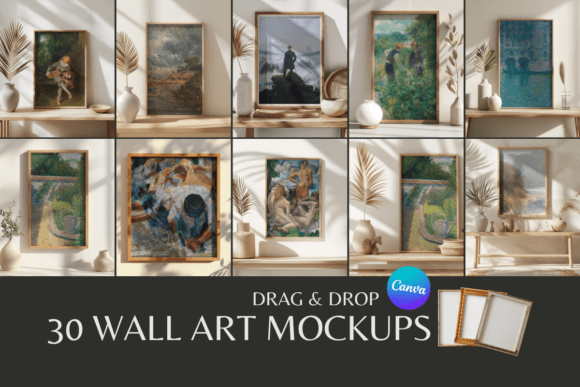
This isn't a simple set of blank frames. Think of this collection as a curated gallery of staging environments. Each of the 30 templates presents your artwork within a carefully composed, photorealistic interior setting. We’re talking about a variety of styles: minimalist living rooms with clean lines, cozy home offices with textured walls, modern bedrooms with soft lighting, and eclectic spaces that add character. The visual personality is consistently professional and aspirational. These settings are designed to feel authentic and inviting, helping your potential customers instantly visualize your work in their own homes. The overall appeal lies in this versatility and the immediate upgrade to your product presentation.
The real power here is the Canva integration. You don't need expensive software like Photoshop or a steep learning curve. Every mockup is a fully editable Canva template, accessible with a free account. This is a game-changer for small business owners, Etsy sellers, and content creators who need high-quality results without the overhead. The process is straightforward: you download the provided PDF, click the link for your chosen mockup, and it opens directly in Canva. From there, you simply drag and drop your artwork into the designated smart object layer, adjust sizing if needed, and export a polished, ready-to-use image.
Where These Mockups Truly Shine: Practical Applications
The utility of a resource like 30 Wall Art Mockups - Canva Templates #3 extends far beyond just listing a print. Consider how it can influence your entire visual strategy and brand identity.
- E-commerce & Product Listings: This is the core use case. On platforms like Etsy, Shopify, or your own website, a lifestyle mockup dramatically increases perceived value and conversion rates. It moves your art from a "digital file" to a "piece of decor," which is what the customer is ultimately buying.
- Social Media Marketing & Digital Content: Create a cohesive and professional feed on Instagram, Pinterest, or Facebook. Instead of just posting the art alone, you can showcase it in a beautiful setting, telling a story and engaging your audience. These are perfect for creating social media graphics that stop the scroll.
- Portfolio & Client Presentations: For designers and agencies, presenting logo concepts or brand artwork in a mockup adds a layer of professionalism that a flat PDF cannot match. It helps clients visualize the end result in a real-world context, strengthening your pitch.
- Blog & Editorial Design: Bloggers and publishers can use these mockups to illustrate articles about interior design, home decor, or art curation, adding rich, visual content without a custom photoshoot.
- Personal Projects & Hobbyists: Even if you’re creating art as a hobby, seeing it "on a wall" is incredibly satisfying and motivating. It’s also a fantastic way to share your work with friends and family in a more engaging way.
Think of these mockups as essential design assets in your toolkit. They function like a versatile display font—their primary job is to present your core content (your art) in the most appealing and legible way possible, ensuring the focus remains on your work while the setting enhances its appeal.
Maximizing Impact: Practical Guidance for Use
Getting the most out of this collection involves a few thoughtful considerations, much like choosing the right typeface for a project.
Evaluating Project Fit: Not every mockup will suit every piece of art. A bold, abstract print might pop in a minimalist, monochrome setting, while a delicate botanical illustration could be complemented by a warmer, more textured room. Browse through the 30 options and select the environment that best matches the mood and color palette of your artwork. The goal is harmony, not competition.
Customization and Brand Consistency: While the mockups provide the scene, you can often tweak elements in Canva to better align with your brand. This might mean adjusting the brightness or contrast to match your usual editing style, or even using Canva's tools to subtly alter the wall color if it conflicts with your art. The key is to use these templates to build a consistent visual language across your listings and social channels, reinforcing your brand identity.
Testing and Presentation: Don’t just use one mockup for all your listings. Create variety. A customer might not connect with a mid-century modern living room, but they might love a cozy study. Showcasing your art in different contexts helps it appeal to a wider audience. Think of it as testing font pairings; you’re pairing your art with different backgrounds to see what resonates best.
Commercial Use and Licensing: The included license allows for commercial use, which is critical. You can use these mockup images in your paid listings, advertisements, and marketing materials. The one clear boundary is simple and fair: you cannot redistribute the unedited mockup templates themselves. The value is in how you use them to present your unique creations.
In the crowded digital marketplace, professional presentation is no longer a luxury—it’s a necessity. 30 Wall Art Mockups - Canva Templates #3 provides a practical, accessible, and powerful solution. It’s about giving your artwork the context and credibility it deserves, turning browsers into buyers by helping them see not just a picture, but a possibility for their own space. By leveraging these templates, you’re investing in the perceived quality of your work and streamlining your creative workflow, allowing you to focus more on creating and less on staging.